Saturday, February 20, 2010

Google Hidden Emoticons - Express ur emotions while chating

Here is list of some cool google Emoticons(Smileys), so guys use them to express your emotions while chatting, some of them are really amazing..

Emoticons TYPE

cowbell +/'\
Crab V.v.V
Devil }:-)
Equal sad =(
Equal slant =/
wince >.<
Pig :(:)
Heart <3
Kiss :*
Mustache :{
Monkey :(|)
Rock out \m/
Shocked :-o
Grin :D
Angry x-(
Cool B-)
Wink ;)
Straight face :-|
Nose wink ;-)
Slant :-/


But keeep in mind that these emoticons works only for googl talk gadgets, Gmail integration chat application and in google talk edition.


Friday, February 19, 2010

Change windows Default Location - Cool Computer Tricks

You can chnage the windows default location where windows look for its installation files. To change windows default drive you have to make some changes in windows registry just follow these steps:

1) Go to RUN.

2) Type regedit and press Enter.

3)Then in Registry Editor window go to

HKEY_LOCAL_MACHINE\Software\Microsoft\Windows\ CurrentVersion\Setup\SourcePath

4) Here you can edit as you wish.

Its done.

Activate and Deactivate SCREENSAVER - Cool Computer Tricks

You can activate or deactivate screensaver whenever you want. You have to make some changes in windows registry after then you can activate your screensaver by simply placing the mouse cursor at the top right corner of the screen and if you take the mouse to the bottom left corner of the screen, the screensaver will deactivate.

Follow these steps:

1) Go to RUN.

2) Type regedit and press Enter.

3) Then in Registry Editor window go to
HKEY_CURRENT_USER\Software\Microsoft\Windows\ CurrentVersion\Policies\Explorer

4) Now in the right pane right click and create a new string value and name it Mouse Corners.

5) Now modify its value and set it to -Y-N.

6) Press F5 to Referesh.

Its done.

To Deactivate it, you have to simply delete this string value.

Thursday, February 11, 2010

Post a BLANK Orkut Scrap - Cool Computer Tricks

Here is a cool trick to send a blank scrap to your friend. Its very simple just follow given steps:

1) Open your friend's scrapbook.
2) In text message box type [i] or [b].
3) Click on post.
Its done.

It post a blank scrap in your friend's scrapbook.
You can also use this trick to post blank messages in communities.

Wednesday, February 10, 2010

Gtalk Chat Shortcut - Cool Computer Tricks

If you chat very frequently with one of your friend then now you can make gtalk chat shortcut on your desktop. It willl initiate a chat with only one click. On click it opens a chat window where you can chat with your friend. But unfortunately this trick works only in window xp nt in window vista.

Here are steps to follow:

1) Right click on your desktop and go to New > Shortcut.

2) In create shortcut window, type gtalk:chat?jid=username@gmail.com. Where username is gmail id of your friend.

3) Click ok.

Its done.

You can also make shortcut to call your friend for that you have to write gtalk:call?jid=username@gmail.com.

Tuesday, February 9, 2010

Automatic Window refresh - Cool Computer Tricks

Whenever you make a change to your windows you have to press F5 or do a manual refresh sometimes its very annoying Now with this trick you can tell windows to increase the rate at which it does the refreshing.
Just follow given steps:

1) Type Regedit in run.
2) In Registry editor window go to HKEY_LOCAL_MACHINE\SYSTEM\CurrentControlSet\Control\Update.
3) Create a new DWORD value, or modify the existing value, named UpdateMode and set it to equal 0 for faster updates. Restart Windows for the change to take effect.

Its done.

Make Folder Invisible - Cool Computer Tricks


Do you have some confidental files want to hide them with other users then this trick is for you. by using this trick you can hide a folder without using any software just follow these steps:

1) Right Click on the desktop(or where you want to create invisible folder) and make a new folder.
2) Now rename the folder with a space (hold ALT key and type 0160).
3) Now you have a folder with out a name.
4) Place your confidental files in this folder.
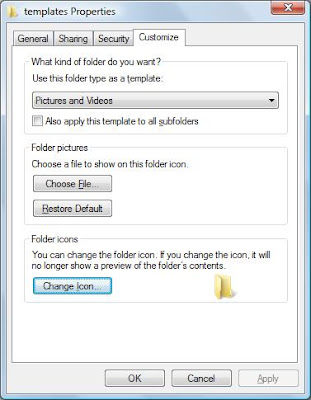
5) Right click on the folder and then on properties.

6) In Property window click on custom tab and then on change icon.
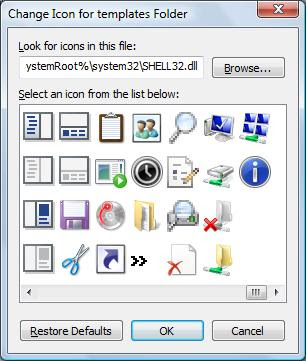
7) In change icon template window, scroll a bit, you should find some empty spaces, Click on that.

8) click ok.

Its done.
Now to make it visible rename it and change its icon by following similar steps.

Set Windows Logon Wallpaper

Logon wallpaper is the wallpaper or image that windows shows on screen when windows logs on (before it asks for username & password) . It’s usually set to the image-logo of the brand of our computer (e.g. in compaq laptops). If you are get tired of watching that wallpaper then now this is right trick for you jaust follow these steps and set it to our own image or any other image(any bmp file)


1) Open Startmenu->Run type regedit and press ok to open registry editor.

2) In registry editor window , In hierarchical structure in left, navigate to registry entry
HKEY_USERS\.DEFAULT\Control Panel\Desktop

3) In right side pane see a number of values placed in a table format. choose the value named Wallpaper from there and double click it.

4) Now you see a box with value name as Wallpaper and value data as Path to the image file .

5) There give the full path of the image(bmp file) which you want to set as logon wallpaper by deleting previous path and writing path to your bmp file e.g. C:\WINDOWS\me.BMP (to set image me.BMP file as log on wall paper).

Also double click on WallpaperStyle and change it’s value to 2 to get a stretched wallpaper at logon.
Put that bmp file in windows directory for better results.
If that is a jpeg file, convert to bmp file by opening in Windows Image Viewer and save as bmp.

Tuesday, February 2, 2010

Hide all Items from desktop - Cool Computer Tricks


Do you want to fascinate your friends?? Here is one cool trick by using this you can hide all Items from desktop including all files , folders and even system folders..
To hide all items just follow these steps:

1) Go to Run.
2) Type Regedit and press enter.
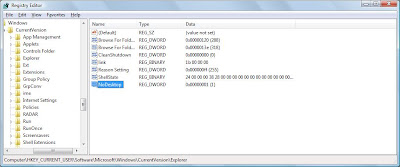
3) Then in Registry Editor Window go to HKEY_CURRENT_USER/Software/Microsoft/Windows/Current Version/Explorer
4) Now in the right pane right click and create a new DWORD item and name it NoDesktop.

5) Now modify it's value and set it to 1.

6) Press F5 to referesh.


Its done.

To enable display of Items , simply delete this DWORD item.


Monday, February 1, 2010

Disable display of Drives in My Computer

You can disable display of local and networked drives when you click My Computer. Try this trick on your friend's computer and see their reactions when they saw their is no drives. To disable dispaly of drives you have to make some changes in windows registry just follow these steps:

1) Go to RUN.

2) Type regedit and press Enter.

3)Then in Registry Editor window go to

HKEY_CURRENT_USER\Software\Microsoft\Windows\CurrentVersion\Policies\Explorer.

4) Now in the right pane right click and create a new DWORD item and name it NoDrives.

5) Now modify it's value and set it to 1.

6) Press F5 to Referesh.

Its done. When you click on My Computer, no drives will be shown.

To enable display of drives in My Computer, simply delete this DWORD item.

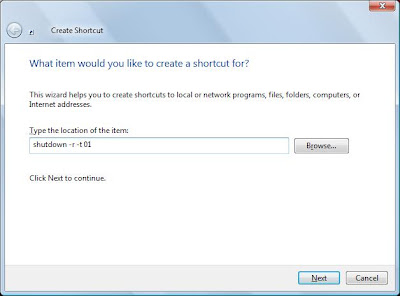
Create Shortcut to restart computer - Cool Computer Trick


Create shortcut to restart computer on your desktop, To create shortcut follow these steps:
1) Go to desktop, Right click on it.
2) Select New >> Shortcut.
3) In new shortcut wizard window type "shutdown -r -t 01" in location.

4) Click Next.
5) Give any name to shortcut, I gave shutdown.
6) Click OK.
Its done.
now you can use this shortcut to restart your computer.